Don’t race the machine. Drive it.
I don’t vibe code Xavier or VoxyAI. AI tools turned me from a worried developer into a manager of tireless ones, and some of my favorite developers run right on my Mac.
I started building Xavier before AI was something people actually used. OpenAI and Anthropic weren’t household names, and nobody kept a chatbot open in the next window. Every line of the early Xavier came out of my own head and my own keyboard.
So let me say something up front, because people ask: I don’t vibe code Xavier or VoxyAI. Claude Code and local models running on my own Mac help me quite a bit, and I’ll show you how. But there is still a ton of hands-on engineering going into both apps. For the past year I’ve worked 12 to 16 hour days, with very little time off. The AI didn’t do that part.
The day I thought I was finished
When AI coding tools started getting popular, I was depressed. I’m not exaggerating. I had spent years learning to code and came into this industry through a side door. Suddenly it looked like the door was closing behind me. I didn’t think I had much of a future, and I was very worried.
Then something shifted. I realized these tools weren’t my replacement. They’re my developers, and I’m their manager. I give them instructions. They do the busy work: the boilerplate, the fifteenth settings screen, the migration script, the tests I’d otherwise put off. Then I go through what they made very carefully, and I edit heavily.
They draft. I review.
That review is the job now. A draft that compiles isn’t the same as a draft that’s right. Knowing the difference is what I bring, and it’s why my days are still so long.
Don’t race the machine
There’s an American folk legend I keep coming back to. John Henry was a “steel-driving man” on the railroads after the Civil War. His job was to hammer a steel drill into solid rock, swing after swing, to make holes for the explosives that blasted tunnels through mountains. He was the strongest and fastest man on the crew.
One day a salesman brought a steam-powered drill to the job and claimed it could out-dig any man alive. John Henry wasn’t having it. He challenged the machine to a race, a hammer in each hand, and the whole crew gathered to watch. When the dust settled, John Henry had driven his steel deeper than the machine. He won.
Then he laid down his hammer, and his heart gave out. In most versions of the song, he dies right there with the hammer in his hand.
I think about him whenever I hear software engineers vow they’ll never touch AI, or scroll past yet another LinkedIn post complaining about “AI slop.” Honestly, I’m a little tired of reading those. I understand the pride. I felt it too. But the legend isn’t a happy ending. The machine was back at work the next morning, and the railroad got built anyway.
The people who did well after the machines arrived weren’t the ones who out-hammered them. They were the ones who learned to drive them, aim them and keep them from bringing the mountain down on everyone. Try it both ways.
Race the machine
Thirty people, nothing shipped
I’ve watched engineering teams of 30 people fail to ship anything. Not because they aren’t smart. They’re often very smart. They’re stuck in an old style of building software: a spec, an estimate, a planning meeting, a hand-off, a review queue, a blocker, another planning meeting. That process made sense when every line of code was expensive. It doesn’t work today, and those teams are John Henry with a very large hammer.
Recently I did a short consulting engagement with a young startup. Everyone on the team was around 20 years old or younger. All they know is building with AI. They’ve never worked any other way, so nobody had to convince them, and nobody had any old habits to unlearn. They moved lightning fast. An idea in the morning was something you could click on in the afternoon.
Same feature, two teams
Watching them, I didn’t feel threatened. I felt like I was seeing the future. This is how software is going to be built, and the teams that keep fighting it will keep getting out-shipped by kids who don’t know there was ever another way.
A new app every day
Now it seems like everyone is shipping a new app every day. Honestly, I didn’t like that at first. It felt like competition from people who hadn’t put in the years.
I’ve changed my mind, and I enjoy it now. Every new app is a free lesson: a clever first-run screen, an idea I never would have had, a better way of explaining something I’d been explaining badly. Even when an app was obviously vibe coded from top to bottom, there’s almost always something in it worth learning. Sometimes the lesson is what not to do, and that counts too.
Why I’m glad I learned to code
I’m grateful for every year I spent learning to code, even though I’m not planning to write every line myself anymore.
Steve Jobs didn’t write code. He didn’t need to. He knew exactly what the product should be, and he could tell instantly when something wasn’t right. That’s the manager’s gift.
My years of coding give me something close to that, with one extra advantage: I can read every line my developers hand me. I know when a force unwrap will crash on a customer’s Mac. I know when a query will be fine with ten devices and fall over at ten thousand. AI made writing code cheap. It made knowing which code is right more valuable than ever.
My favorite developers live on my Mac
I’ve really come to love local, on-device AI. Apple’s MLX runs models directly on Apple silicon, in the same memory as everything else on the Mac, and it’s fast. VoxyAI is built around it, and it’s really amazing at this.
It’s also how a lot of my own coding happens. VoxyAI can serve its local models to developer tools, including Claude Code, on a Mac or a Windows PC. On my Mac, I turn on Coding Tools, click Add to ~/.zshrc, and run claude-local in a new Terminal window. Claude Code works just the way it always does, but the model answering it is running on my own computer. Your code never leaves the building, and there’s no meter running.
Claude Code, answered on your own computer
Tokens generated: 0 · Sent off your computer: 0 bytes
Two projects I really will vibe code
Xavier and VoxyAI get careful, hands-on engineering, because people depend on them. But I’m curious what pure vibe coding can do when the stakes are low and the idea is fun. When I get some free time, I have two projects lined up.
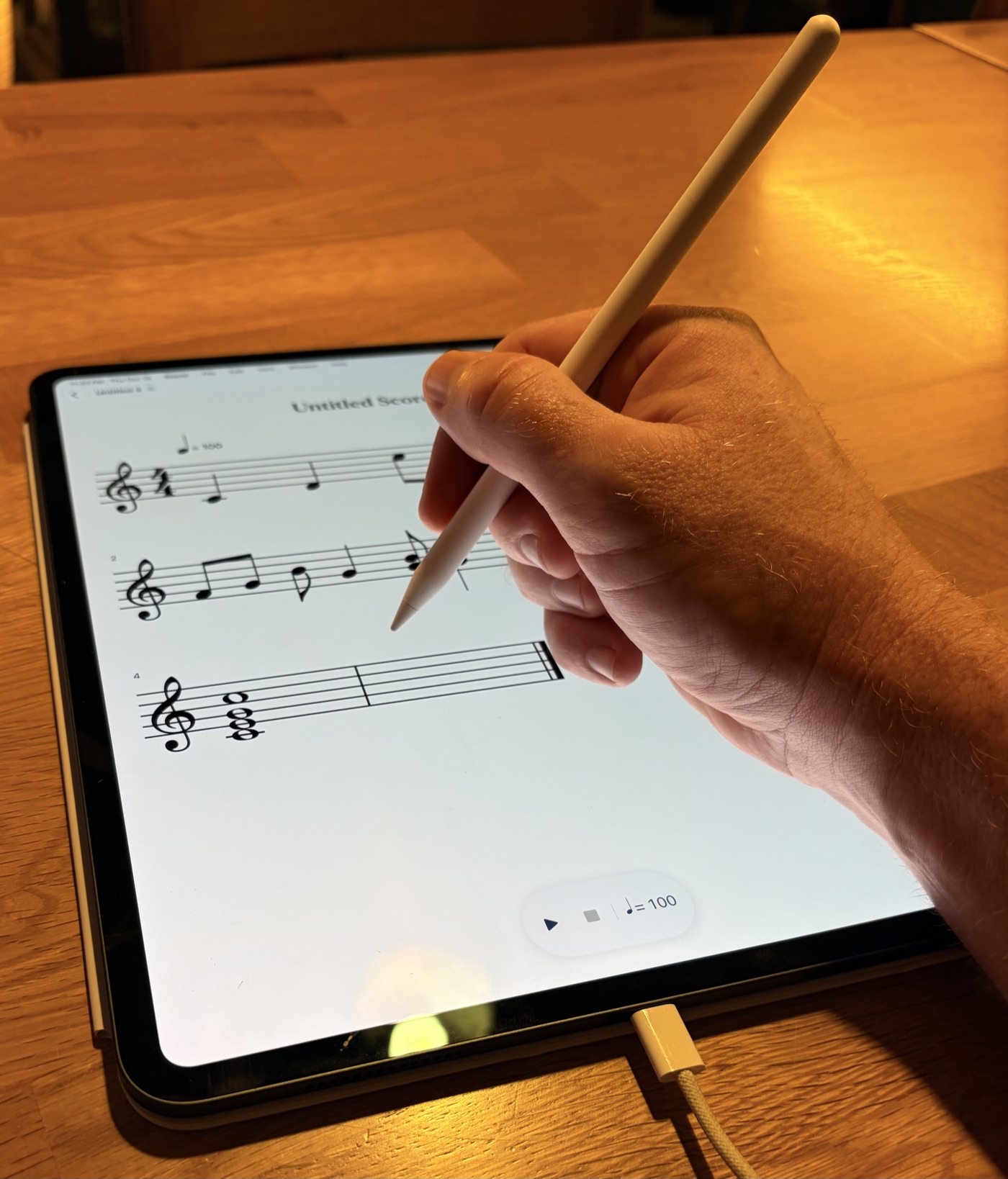
A music notation app for iPad
I’ve already started this one, and my early prototype is really very good. You write music by hand with Apple Pencil. The app recognizes your handwritten notes, transcribes them onto the staff and plays them back. Before software, I spent 20 years as an organist and conductor, scribbling on manuscript paper. Watching my own scrawl turn into clean notation that plays itself still feels a little like magic.
A modern operating system for the Apple IIGS
Yes, really. The Apple IIGS came out in 1986 with a 2.8 MHz processor and 256 KB of memory. I want to completely vibe code a modern operating system for it, as a hobby project. Crazy? Probably. That’s what makes it fun.
And I intend to do it completely within VoxyAI, with local models on my Mac. VoxyAI’s Projects let a chat read, write and edit the files in a folder, so the whole thing can live there: prompts, drafts, and a lot of rebooting an emulator.
The models won’t be working from memory, either. A 1986 computer is exactly the kind of thing a model half-remembers and then confidently gets wrong. So I’m adding the Apple IIGS technical reference manuals to VoxyAI’s knowledge library on my Mac: the hardware, firmware and toolbox references. When a model needs to know which memory bank holds the screen, or how to talk to the sound chip, VoxyAI looks it up in the manual first and hands the model the right pages. That’s called RAG, short for retrieval-augmented generation, and like everything else in VoxyAI, it runs on my own computer.
Read the manual, write the code, boot it
Will it work? I have no idea. I’ll write about it either way.
Your machine is waiting
I’m not John Henry, and I’m not trying to be. The hammer taught me how rock behaves, and I’m glad I swung it for all those years. But I’m not going to race the machine. I’d rather drive it: aim it, check its work and decide where the tunnel goes.
If you’re a developer who feels the way I felt when these tools arrived, I understand. Don’t race the machine. Learn to drive it.
If you want a machine of your own, VoxyAI is the easiest place to start. It makes using AI very simple. It runs on Mac, Windows and Android, and on iPhone and iPad when paired with a host computer that does the heavy lifting. VoxyAI looks at your computer, recommends models that will run well on it, and downloads the one you pick. Then you can talk to it, chat with it, search your own documents with it, or point Claude Code at it. It all runs on your own device, privately, with no meter running, and it never gets tired.
Download it, pick a model and take it for a drive.